Project · July 2026 · working

KiCad-Autoplace: connectivity-aware auto-placement & routing for KiCad

A desktop app that takes a prepared KiCad board — outline, locked parts, ground pours — generates and scores several placement candidates, refines the winner, and routes it with FreeRouting, handing back a finished, fab-ready .kicad_pcb. Built for the students at DTU Ballerup — and used to mill real boards.

PythonElectronKiCadPCB automationFreeRoutingSimulated annealingDesktop app
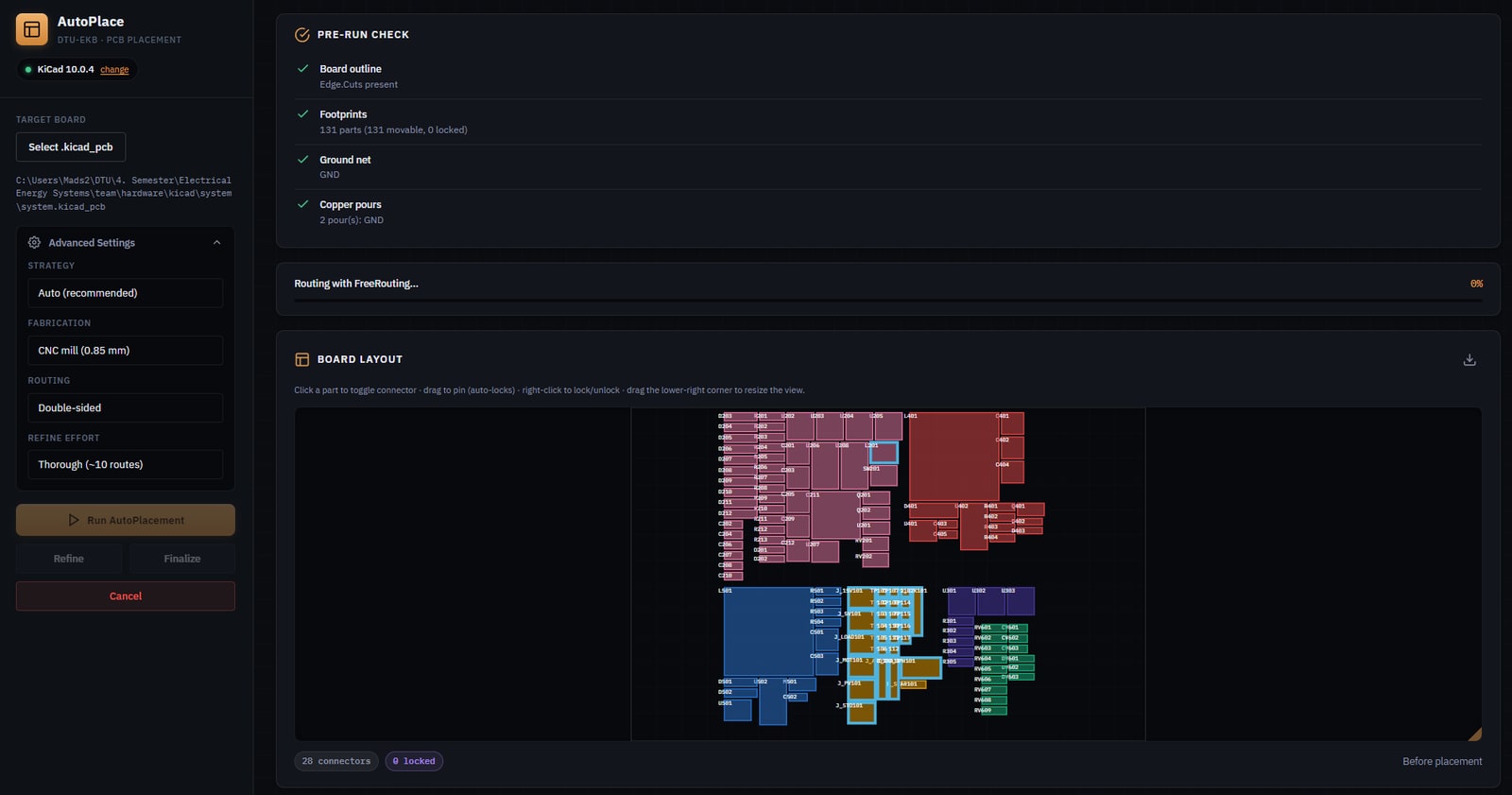
The AutoPlace desktop app — sidebar with strategy/fabrication/routing settings, a green pre-run check, and a board canvas of 131 colour-coded footprints before placement
The desktop app: load a board, confirm it's ready, tune strategy / fabrication / routing, and run. Here 131 footprints across six circuit blocks sit in their raw import positions, colour-coded by sub-block, before placement.

What it is

KiCad-Autoplace automates the tedious middle of PCB design: component placement and routing. You prepare a board in KiCad — draw the outline, lock any parts you care about, add your ground/power pours — and the app places everything else, routes it, and hands back a finished .kicad_pcb. It’s built for the students at the DTU Ballerup electronics workshop, and it’s the placement-and-routing half of the same fabrication workflow behind my SRM-CAM mill tool: SRM-CAM turns a finished board into machine code, this one produces the finished board in the first place.

It’s effectively a solo build (mine, with a CI bot filling in the rest).

How it works, in practice

Rather than gamble on one greedy layout, the engine generates several placement candidates in parallel and scores each — wirelength (HPWL), reduction vs. the raw import, net-crossing count, and overlaps — and presents them as a gallery to pick from.

A gallery of six generated placement candidates, each scored by wirelength, percentage reduction, net crossings, and overlaps
Several candidate placements are generated and scored automatically; the lowest-crossing layout at competitive wirelength is recommended.

Pick a candidate and the results speak in hard numbers — on this 131-part board, 33.6% shorter total wirelength, net crossings cut from 427 to 164, and zero overlaps after legalisation.

Results dashboard: wirelength 2878mm (minus 33.6%), net crossings 164 (down from 427), overlaps 0, 131 components across 6 blocks
After a run: −33.6% wirelength, crossings 427 → 164, 0 overlaps, 131 components across six blocks.

Then a route-driven refinement pass routes the board with FreeRouting and re-anneals the congested spots, tracking the live routed estimate as it goes.

A refinement progress bar showing iteration 2 of 10 and a live routed estimate of 97.8 percent
Refinement tracks the live routed estimate in real time.
FreeRouting's routed output rendered back inside the app, 97.8 percent auto-routed
FreeRouting's result rendered back inside the app — 97.8% auto-routed — before you ever reopen KiCad.

The payoff: a real board

The point of all this is a board you can actually make. Here’s the same design in the KiCad PCB editor — the raw import the tool starts from, and the placed-and-routed result it produces:

Raw imported board in the KiCad PCB editor — footprints unplaced and overlapping, ratsnest lines crossing everywhere
Before — the raw schematic import in KiCad: footprints unplaced and overlapping, ratsnest crossing everywhere.
The same board fully placed and routed in the KiCad PCB editor, with copper pours and complete routing
After — the same board placed and routed by the tool. This exact design was fabricated.
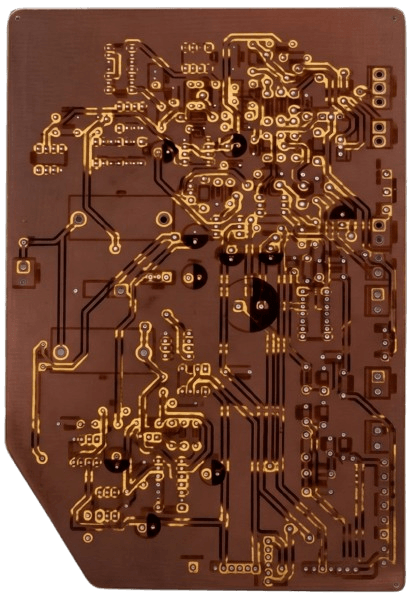
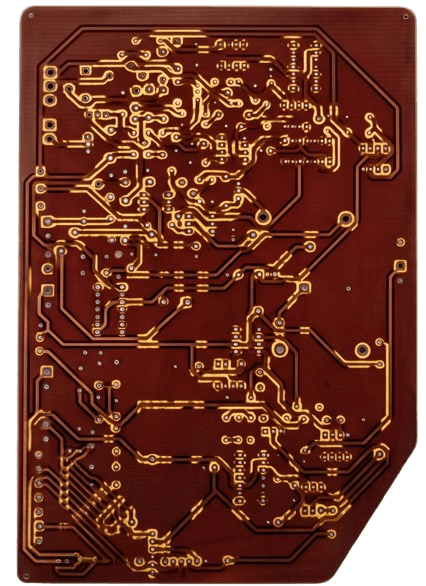
The bare CNC-milled board, front copper The bare CNC-milled board, back copper
The real CNC-milled board straight off the pipeline — front and back copper, not yet populated.

Under the hood

The engine core is pure Python with no KiCad dependency — placement, routing orchestration, and refinement — with a thin kicad_io / routing / refine layer bridging to KiCad’s bundled pcbnew and to FreeRouting. On top sits an Electron desktop app; a cli.py headless runner (place, place-multi, refine, finalize, preflight, metrics) drives the same engine, and because the core is dependency-free the tests run under any Python. It also ships as a KiCad PCM plugin.

The pipeline itself is classic: block detection → a floorplan or force-directed seed → simulated-annealing refinement → legalisation → an aesthetic alignment pass. But the part I care about most is the gate around it: a change only lands if the unit tests stay green, and it doesn’t regress FreeRouting’s routed-% on the canonical gate boards, and its own proxy metric improves. FreeRouting is noisy (±3 nets run-to-run), so anything smaller than that is treated as noise, never signal. That gate is what lets the engine be tuned aggressively — including through AI-orchestrated optimisation sessions — without silently making things worse; it’s the same verification-first way I work with AI everywhere else.

What went wrong and how it was diagnosed

The two worst bugs both hid in the measurement, not the engine.

The boards weren’t placing badly — the scoreboard was lying. For a while the small test boards appeared to route only 59–81%, under both the tool’s placement and the humans’ original layouts. That looked like a routing ceiling — until we looked at what was left unrouted. It was the ground net, every time. The cause was in the gate harness: ground pours declared with no net were filled but never electrically tied to a pad, so FreeRouting saw a filled plane and counted every ground connection as permanently unrouted. Once the ground pours were connected with thermal spokes, the same boards routed 100%. Every routed-% logged before that fix was deflated — a sharp reminder that a number you don’t trust is worse than no number at all.

A “deterministic” engine that wasn’t. Placement with a fixed seed was supposed to be perfectly reproducible, but under concurrent CPU load the same board would occasionally settle into a slightly different layout. The root cause was a single unordered iteration: the cost function summed per-net wirelength by looping over a set of net-name strings, so the floating-point accumulation order followed Python’s hash randomisation. A last-bit difference in one sum was enough to flip a single simulated-annealing accept — which then cascaded into a different final layout. Sorting the nets before summing made it bit-for-bit reproducible across processes, verified by replaying a board under a range of hash seeds.

What it achieves

Tools & skills demonstrated

A real desktop application (Electron over a pure-Python engine), PCB-domain automation (connectivity-aware placement via simulated annealing, plane-aware routing, FreeRouting orchestration, fabrication-rule handling), and — the part I’m proudest of — a rigorous measurement and gating methodology that makes engine changes provable rather than plausible. A substantial, self-directed tool that other people at DTU actually use to make real boards.


← All projects

Available for Jan 2027 Praktik